
Building a Log Analysis Agent with LangGraph and Bronto's MCP Server
David Tracey
CTO

In the Bronto Hosted MCP Server post, we demonstrated the power of our MCP server by asking a number of investigation-related questions using Claude prompts to generate requests to the Bronto MCP server. This showed the power of both Claude in generating requests and of the tools in our MCP server. We designed our MCP server to provide rich functionality using our REST APIs, so it's not simply used as a proxy for API calls.
In this blog, we will show how you can achieve this same functionality directly by using a LangGraph agent to talk directly to our MCP server and to an LLM, without having to use Claude. While Claude works well in an interactive manner and for doing ad hoc operations, you may prefer to build your own agent for defined, repeated operations. This blog will show you how to build that agent and will illustrate some issues that arose.
Why Teams Are Using LangGraph
LangGraph is a "low-level orchestration framework and runtime for building, managing, and deploying long-running, stateful agents". It is a well-known and popular tool to build AI agents, especially for complex, multi-agent systems or in production environments. It uses directed graphs to model (potentially complex) agent workflows. The nodes in the graph are functions and the edges between nodes define the control flow. LangGraph can be used standalone, as in these examples, but can also integrate with other LangChain products.
LangGraph has the following benefits:
State Machine Logic: it can be used to implement complex state transitions allowing it to handle conditional routing and loops (e.g. to retry failed calls).
Control and Scalability: rather than relying on an LLM to determine the next step, LangGraph requires you to define the workflow, which can save token costs and reduce unpredictable/unexpected logic in your agent.
Persistence: agents can run for extended periods and can persist through failures and resume operation.
Multi-Agent Orchestration: its handling of defined states allows you to more easily build structured, traceable/auditable systems, where multiple specialized agents cooperate, communicate and maintain context over long-running interactions.
Human-in-the-loop: you can explicitly define where human approval is needed.
LangGraph provides the way to build orchestration, state control, and customizability into an agent that can also call an LLM at defined states in a workflow, allowing the agent to reduce LLM usage and to operate in a repeatable and auditable manner. It also allows you to easily mix and match models, using Claude for heavy reasoning but a cheaper, faster model for routing or simple data parsing.
Preparing to use LangGraph
LangGraph is simple to install as shown below by installing support for Anthropic and OpenAI:
python3 -m venv mcp-env
source mcp-env/bin/activate
pip install -U langgraph langchain-openai
pip install -U langchain-anthropic
In order to use Anthropic, you need to add your Anthropic API key to your environment as below (or set it in whichever file you use to set up your environment, such as .profile):
export ANTHROPIC_API_KEY="Insert Your API Key here"Installing FastMCP
We will use FastMCP in this blog. A useful link explaining how to use FastMCP and code samples can be found here. For this example, do pip install fastmcp into the virtual environment set up above using venv. Then add the following imports into your Python program.
from fastmcp import Client
from fastmcp.client.auth import BearerAuth
from fastmcp.client.transports import StreamableHttpTransport
The code to create the FastMCP client to connect and send to Bronto's MCP server is as follows (using a simple global variable to avoid recreating the client object on every call), where you have already initialised the DEMO_API_KEY to be your Bronto API key.
async def get_mcp_client():
    server_url = "https://mcp.eu.bronto.io/mcp"
    api_key = DEMO_API_KEY

    transport = StreamableHttpTransport(
        url=server_url,
        headers={
            'X-BRONTO-API-KEY': api_key
        }
    )

    global mcp_client
    if mcp_client is None:
        # Initial connection logic
        mcp_client = Client(transport)

    return mcp_client
The Bronto MCP server is then called by client = await get_mcp_client().
Using the Bronto MCP Server in LangGraph
We will create two convenient methods to call the Bronto MCP Server using the FastMCP mcp_client shown above:
get_mcp_tool_info(tool_name)to call the Bronto MCP server and get the information it has relating to the specified tool.call_mcp_tool(tool_name, mcp_params)to call the specified tool in the Bronto MCP server, with the appropriate parameters. Those parameters will be determined by using the tool's information returned fromget_mcp_tool_info(tool_name).
The first method get_mcp_tool_info() follows:
async def get_mcp_tool_info(tool_name):
    client = await get_mcp_client()
    try:
        async with client:
            tools = await client.list_tools()
            target_tool = next((t for t in tools if t.name == tool_name), None)

            if target_tool:
                tool_details = [
                    f"Tool Name: {target_tool.name}",
                    f"Description: {target_tool.description}",
                    f"Parameters: {target_tool.inputSchema}"
                ]
                tool_details_string = " ".join(tool_details)
            else:
                print(f"Tool '{tool_name}' not found.")

            return {tool_details_string}

    except Exception as e:
        print(f"An error occurred: {e}")
        return {str(e)}
    finally:
        print("Retrieved MCP Tool Info")
The second method call_mcp_tool() uses the FastMCP client above.
async def call_mcp_tool(tool_name, mcp_params):
    client = await get_mcp_client()
    try:
        async with client:
            # Returns a CallToolResult
            result = await client.call_tool(tool_name, mcp_params)

            final_output = ""
            for content in result.content:
                if content.type == 'text':
                    final_output += content.text
                else:
                    print(f"Error: Received {content.type}")
            return {final_output}

    except Exception as e:
        print(f"An error occurred: {e}")
        return {str(e)}
    finally:
        print("MCP Tool Call Finished")
Building the MCP Call Parameters for LangGraph Agents
Now that we have set up LangGraph for our agent, connected it to the Bronto MCP server, and set up these methods, we next need to build MCP call parameters to ensure consistent results, where the MCP call parameters will be based on the response for a particular tool from the MCP server, e.g. for search_logs tools the parameters would be the dataset ids and the query including the "where" clause.
We will use the prompts in the blog Bronto Hosted MCP Server as a way to test if we get the same results in our LangGraph agent as when those prompts were used in Claude. This will enable us to see how easy (or not) it was to build such an agent.
Building the prompt to generate the MCP parameters required the following steps:
Defining the natural language query — in this case, this is based on the query used in Claude in the earlier blog.
Call
generate_mcp_params(tool_name, natural_lang_query)which callsget_mcp_tool_info(tool_name)and uses the response to build the MCP parameters.
The code for generate_mcp_params() follows and see how easy it is to call the LLM in LangGraph using llm.ainvoke(). Note the highlighted messages used in this code to build the prompt are explained in the next section.
async def generate_mcp_params(tool_name, natural_lang_query):
    tool_info = await get_mcp_tool_info(tool_name)

    response = await llm.ainvoke([
        SystemMessage(f"You are a tool-call parameter generator. Output ONLY a valid JSON object for the {tool_name} MCP tool call parameters. No explanation, no markdown, no prose. Do not use markdown code fences."),
        HumanMessage(f"Using {tool_info} generate the {tool_name} MCP tool call parameters for: {natural_lang_query}. Output only the JSON parameters object.")
    ])

    # resp is <class 'langchain_core.messages.ai.AIMessage'>
    # Extract content and drop metadata at end of langchain response
raw =
response.content.strip().removeprefix("```json").removeprefix("```").
removesuffix("```").strip()

    params = json.loads(raw)
    return params
Creating the Correct Prompts
Initially, I simply started with the prompts used in the original post and passed them to the method generate_mcp_params(). This did not give good results and manually trying to adjust the prompt based on the response from the LLM was tedious and slow, so I asked Claude to help define the prompts to use in the LangGraph agent.
This resulted in setting the prompt as follows:
generate_mcp_params()as shown in the code above as a generic way to generate the MCP parameters. Claude suggested the system prompt used here and how to embed the original natural language query in a richer prompt. I had to add"Using {tool_info}"to the prompt suggested by Sonnet 4.6, but otherwise this worked well in generating the format of parameters for a particular MCP tool.In the original blog using Claude, the simpler prompts did generate invalid requests, but Claude retried 3 or 4 times or more until it built a request that did not result in an error response. This was user-friendly in enabling requests to be built with less knowledge of the system it is querying, but you lose control of what requests it makes and of any costs associated with making multiple requests.
Just using
generate_mcp_params()created syntactically correct MCP requests, but it did not necessarily generate the correct parameters for the request.For example, the LLM did not generate correct keynames in logs and in some cases hallucinated keynames not mentioned in prompts or in previous responses.
This resulted in the specific LangGraph node methods (shown later) adding more context to the original prompt before calling
generate_mcp_params().
Having fixed the generation of the prompts to use in tool calls, I was curious about why I had to extend the prompts from the ones used in Claude, so I asked Claude with the prompt:
"When I call sonnet 4.6 from
llm.invokein LangGraph with the same prompt it does not identify cdn logs specifically and just provides a summary of datasets."
Claude provided a detailed explanation of why the prompt used in LangGraph had to be more explicit than in Claude, including the following: "When I called get_datasets, I received the full structured JSON response and then reasoned over it directly" and "System prompt / task framing — I had the full context of your question — 'which datasets contain production CDN logs for our edge or delivery layer' — active while I was processing the tool results."
The Graph and Nodes
The graph below illustrates how to use LangGraph and the Bronto MCP server by reproducing the calls made in Claude in the earlier blog — production agents would be more likely to use graphs designed for particular purposes, such as a defined set of nodes and edges, with conditions, for Root Cause Analysis (RCA).
The program consisted of a simple graph of the following methods to investigate CDN logs in Bronto. The code for these methods is included in the Appendix.
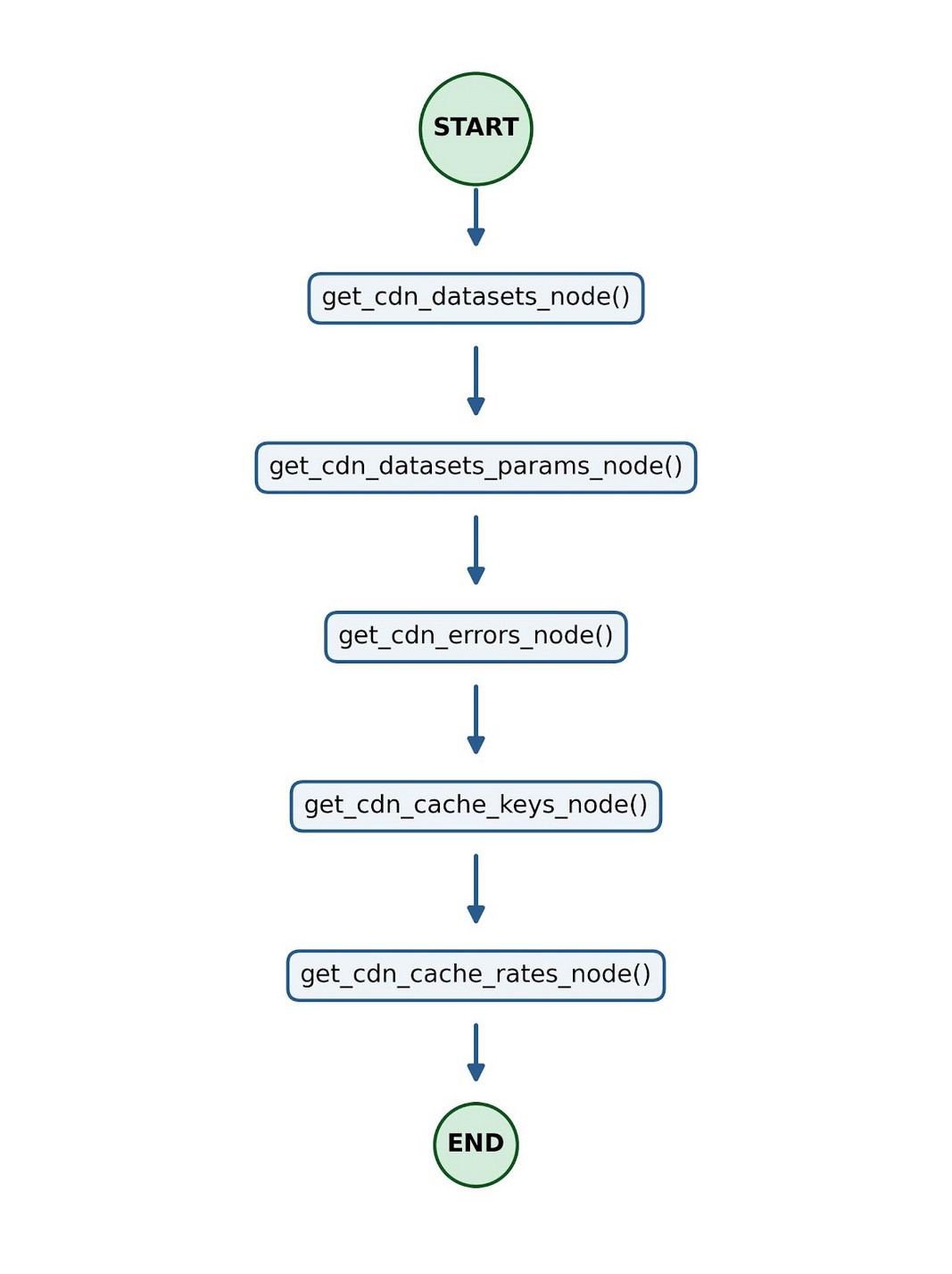
get_cdn_datasets_node()— Determines which datasets contain production CDN log events by calling theget_datasets()tool first (which does not require any parameters itself) and then constructing a prompt with those datasets to call the LLM to select the production CDN logs in those datasets. A section of a sample response for one of the logs follows:“content='## Datasets Containing Production CDN Log Events (Edge/Delivery Layer) After carefully reviewing all datasets, here are the ones that match — specifically those with CDN-related names, services, or descriptions in a production or CDN-platform environment: ### **`cdn` — collection: `Akamai`** **Log ID:** `--uuid was here- **Tags:** `service: cdn`, `environment: Akamai`, `region: us-east-1`\n- **Description (tag):** *"This dataset contains CDN log data for the BrontoAkamai system. This data contains typical web access log information such as client IP addresses, response times, status codes, etc."* **Why it matches:** Explicitly named `cdn`, tagged as a CDN service, running on Akamai (a major CDN/edge delivery platform), with a description confirming CDN web access log content. ###get_cdn_datasets_params_node()— Similar toget_cdn_datasets_node(), but uses a slightly different prompt as the explanation is not needed and invokes the LLM (with a system prompt similar togenerate_mcp_params) as this is preparing the CDN datasets to be used as parameters into subsequentsearch_logsortimeseriestool calls.get_cdn_errors_node()— Uses the CDN datasets from the previous state (stored in a state variable) embedded in a prompt togenerate_mcp_params()for thesearch_logstool and then callssearch_logsto get 5xx errors in those datasets. It returns up to 10 (specified in prompt) log events.get_cdn_cache_keys_node()— Uses the CDN datasets from the earlier state embedded in a prompt togenerate_mcp_params()for theget_keystool and then prepares a prompt for the LLM to select cache-related keys from the returned keys. It also includes "explain why each one matches" in the prompt looking for cache-related keys — its response is intended to be informational, but can also be used as input on relevant cache keys to generate the MCP parameters for tool calls such as totimeseries.A section of what the LLM returns follows:
## Cache-Related Fields from Akamai CDN Logs
After carefully inspecting all keys, here are the ones directly relevant to **cache miss rate analysis**:
## 🎯 Primary Cache Fields

| Field | Type | Why It Matches |
|--------|--------|-----------------------|
| `cacheStatus` | NUMBER | **Core field** — indicates the cache state of a request (e.g., hit, miss, expired, revalidated). Directly used to identify cache misses. |
| `cacheable` | NUMBER | Indicates whether the object **is eligible** for caching. Critical for distinguishing misses from uncacheable requests. |
| `maxAgeSec` | STRING | The cache TTL (Time-To-Live) value in seconds. Helps understand **why** objects may be missing or expiring from cache. |

And it also returns more information under sections “Supporting Fields for Miss Rate Analysis”, “ Recommended Query Logic” and “Fields Excluded & Why”
get_cdn_cache_rates_node()— Uses the CDN datasets and the CDN cache keys as state variables, from the earlier MCP tool calls, embedded in a prompt togenerate_mcp_params()for thetimeseriestool and then callstimeseriesto retrieve cache miss rates in the last 24 hours.This generates a
timeseriesrequest using thecacheStatuskey with the other parameters below and it returns a timeseries of counts and statistical information.{'timerange_start': 1748649600000, 'timerange_end': 1748736000000, 'log_ids': ['--------uuid was here--------'], 'from_expr': '"collection" IN (\'Akamai\') AND "dataset" IN (\'cdn\')', 'metric_functions': ['COUNT(*)', 'SUM(cacheStatus)'], 'search_filter': 'cacheStatus = 0', 'group_by_keys': ['cacheStatus'], 'time_range': 'Last 24 hours', 'num_of_slices': 24, 'delta': {'enabled': True, 'natural': 'Previous day'}}
Note: The explicit saving and retrieving of CDN data and CDN cache keys using the graph's state and state.get() reduces the repeated calls to the LLM.
The graph is built as below, with the specified variables in the state, a node added for each method and an edge added to define the flow between nodes. More complex graphs can be built with specific conditionals in LangGraph.
class GraphState(TypedDict):
    cdn_datasets_for_params: str
    cdn_cache_keys: str

    # Set up the llm to be used
    llm = ChatAnthropic(
        model = 'claude-sonnet-4-6'
    )

    # Build the Graph
    workflow = StateGraph(GraphState)

    workflow.add_node('Get_CDN_Datasets', get_cdn_datasets_node)
    workflow.add_node('Get_CDN_Datasets_Params', get_cdn_datasets_params_node)
    workflow.add_node('Get_CDN_Errors', get_cdn_errors_node)
    workflow.add_node('Get_CDN_Cache_Keys', get_cdn_cache_keys_node)
    workflow.add_node('Get_CDN_Cache_Rates', get_cdn_cache_rates_node)

    # Use START and END constants for clarity
    workflow.add_edge(START, 'Get_CDN_Datasets')
    workflow.add_edge('Get_CDN_Datasets', 'Get_CDN_Datasets_Params')
    workflow.add_edge('Get_CDN_Datasets_Params', 'Get_CDN_Errors')
    workflow.add_edge('Get_CDN_Errors', 'Get_CDN_Cache_Keys')
    workflow.add_edge('Get_CDN_Cache_Keys', 'Get_CDN_Cache_Rates')
    workflow.add_edge('Get_CDN_Cache_Rates', END)

    app = workflow.compile()

    async def run_graph():
        initial_state = {"cdn_datasets_for_params": ""}
        final_state = await app.ainvoke(initial_state)

    # Run it
    asyncio.run(run_graph())
Running Investigations with LangGraph and Bronto
LangGraph works very well with the Bronto MCP server, FastMCP client and an LLM. We have shown that it is relatively easy to build LangGraph agents with a defined workflow that uses Claude to generate prompts for, or analyse data from, the Bronto MCP server and also uses the FastMCP client to communicate with the Bronto MCP server. It is easy to see how investigation tasks could be automated using such agents.
The sample agent here shows that it is straightforward to build in LangGraph, even though LangGraph is a flexible low-level orchestration framework. More importantly, it demonstrates that you do not have to rely on an LLM to dictate the next step in a series of actions, but can do that using a defined graph to explicitly control the workflow.
It's not always so straightforward to get the same results with what look like the same prompts in Claude and in a LangGraph program, but you can use the approach we showed earlier to have Claude help create equivalent prompts for use in LangGraph programs.
While demonstrating the use of LangGraph for defining workflows, the sample agent here does not really exercise that capability. Stay tuned for future blogs where we will show how to build agents that use these graphs to build richer investigations using an LLM and Bronto's MCP server.
Appendix — Code for Node Methods
Note this code is written to illustrate the use of LangChain and our MCP server and is not intended for production use, e.g. note that some parts of the prompts are shared in these methods, but are shown separately in each node method for readability.
The code for get_cdn_datasets_node() follows.
async def get_cdn_datasets_node(state: GraphState):

    tool_response = await call_mcp_tool("get_datasets", {})

    # Original prompt was
    prompt_for_cdn_datasets = "Which datasets contain production CDN log events for our edge or delivery layer from the following log metadata?"

    full_prompt = f"""
        The user asked: "{prompt_for_cdn_datasets}"
        Here are ALL available datasets in full: {tool_response}
        Inspect every dataset carefully — name, collection and all tags (especially environment,
        service, description). Return only the datasets that match the user's intent, and explain
        why each one matches."""
    response = await llm.ainvoke(full_prompt)
    return {"cdn_datasets_for_params": response.content}
The code for get_cdn_datasets_params_node() follows.
async def get_cdn_datasets_params_node(state: GraphState):

    tool_response = await call_mcp_tool("get_datasets", {})

    # original prompt was
    prompt_for_cdn_datasets = "Which datasets contain production CDN log events for our edge or delivery layer from the following log metadata?"

    full_prompt = f"""
        The user asked: "{prompt_for_cdn_datasets}"
        Here are ALL available datasets in full: {tool_response}
        Inspect every dataset carefully — name, collection and all tags
        (especially environment, service,
        description). Return only the datasets that match the user's
        intent."""

    response = await llm.ainvoke([
        SystemMessage(f"You are a generator of dataset identifiers. Output ONLY a valid JSON object for the dataset identifiers. No explanation, no markdown, no prose. Do not use markdown code fences."),
        HumanMessage(f"{full_prompt}.")
    ])

    return {"cdn_datasets_for_params": response.content}
The code for get_cdn_errors_node() follows.
async def get_cdn_errors_node(state: GraphState):

    cdn_data = state.get("cdn_datasets_for_params", "")

    natural_lang_query = f"In the last 30 minutes, look through the CDN logs identified in {cdn_data} for elevated 5xx in the response_status key. Limit to 10 events in the response"

    mcp_params = await generate_mcp_params("search_logs", natural_lang_query)

    mcp_response = await call_mcp_tool("search_logs", mcp_params)
    return {"llm_output": mcp_response}
The code for get_cdn_cache_keys_node() follows.
async def get_cdn_cache_keys_node(state: GraphState):

    cdn_data = state.get("cdn_datasets_for_params", "")

          natural_lang_query = f"In the last 24 hours, look through the Akamai CDN log identified in {cdn_data} and extract the keys for that log"

    mcp_params = await generate_mcp_params("get_keys", natural_lang_query)

    cdn_keys = await call_mcp_tool("get_keys", mcp_params)

    user_prompt_for_cache_info = "Search our Akamai CDN logs for cache-related fields."

    full_prompt = f"""
        The user asked: "{user_prompt_for_cache_info}"
              Here are ALL keys from the Akamai datasets: {cdn_keys}
        Inspect every key name carefully and return only the ones
        that match the user's intent for cache data and explain why
        each one matches.
        """

    cdn_cache_response = await llm.ainvoke(full_prompt)
    return {"cdn_cache_keys": cdn_cache_response.content}
The code for get_cdn_cache_rates_node() follows.
async def get_cdn_cache_rates_node(state: GraphState):

    cdn_data = state.get("cdn_datasets_for_params", "")
    cdn_cache_keys = state.get("cdn_cache_keys", "")

    natural_lang_query = f"The Akamai CDN log has the cdn cache information identified in {cdn_cache_keys}. Use that cdn cache information and the cdn logs in {cdn_data} to show whether cache miss rates increased in the last 24 hours."

    mcp_params = await generate_mcp_params("timeseries", natural_lang_query)

    cdn_cache_rates = await call_mcp_tool("timeseries", mcp_params)
    return {"cdn_cache_rates": cdn_cache_rates}
Try Bronto free for 14 days
Centralize your agent and infrastructure telemetry in one platform with sub-second search and 12-month hot retention. No credit card required.