
From Clicks to Code: Managing Bronto with Terraform and MCP
Gary Nicholls
Lead Software Engineer
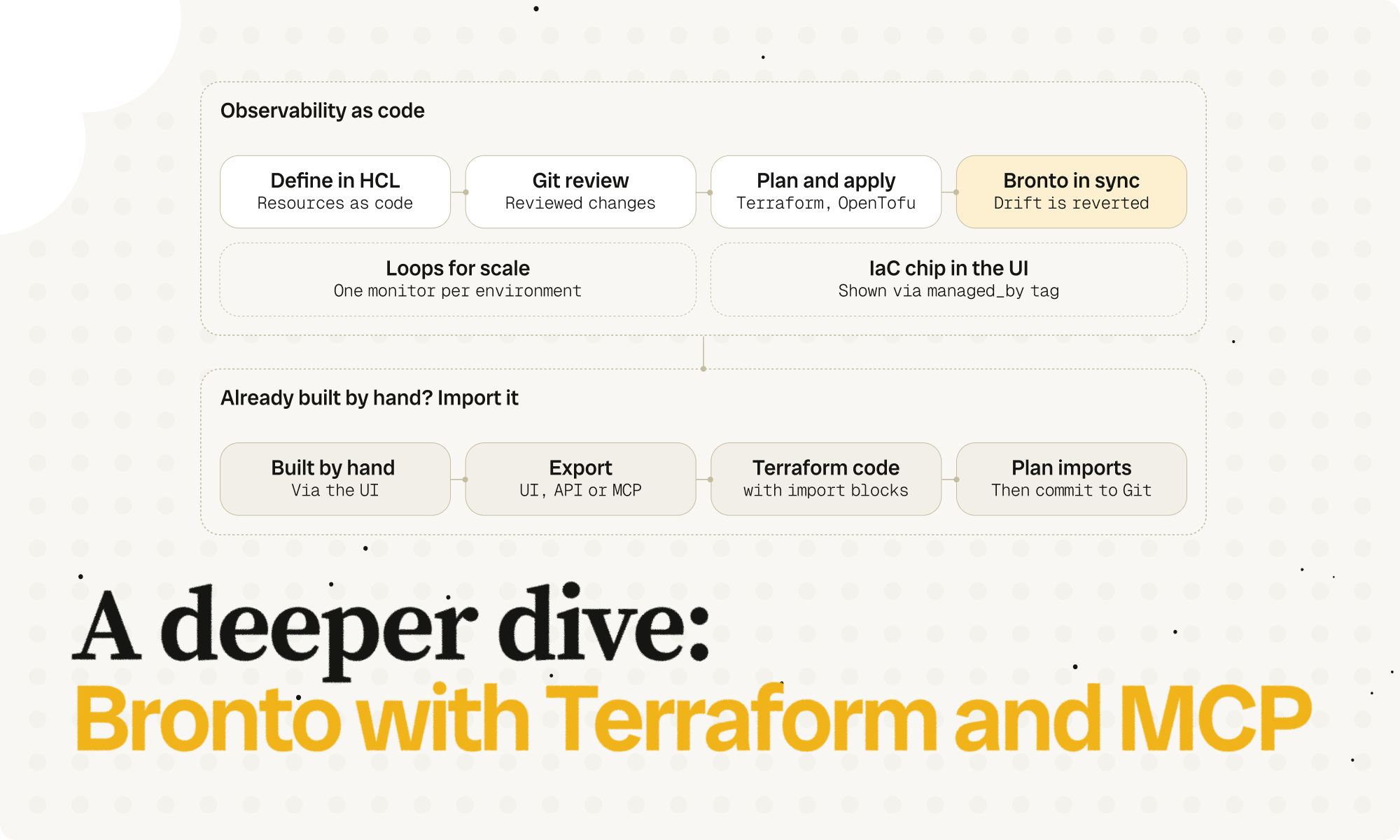
Bronto's Terraform provider, which works with OpenTofu too, lets you manage dashboards, monitors and more as code. Export what you've already built from the UI, the API, or by just asking an LLM connected to our MCP server, and bring it under management without changing a thing.
Why Observability Belongs in Code
If you're monitoring a single endpoint, setting up observability through the UI ("ClickOps") is easy: a dashboard with two or three widgets, a monitor or two, and an alert destination. It's quick to set up, and if someone makes an accidental change, it's just as quick to fix.
But what happens when you need to do this for hundreds of endpoints across multiple regions, and maybe for several orgs? How do you make sure every new endpoint gets monitoring set up promptly? How are changes reviewed? How do you keep everything in sync across regions?
Bronto could build solutions for some of these problems, but why reinvent the wheel? Virtually every software engineer and SRE already knows Git, and it makes an ideal single source of truth where every change can be peer reviewed. Pair Git with HashiCorp’s Terraform (or OpenTofu) and you get Observability as Code (OaC): applying Infrastructure as Code (IaC) principles to your observability setup. Your dashboards, monitors and other resources are defined in HCL (HashiCorp Configuration Language), stored in Git, and managed by Terraform, which keeps your Bronto environment in sync with your code. If a resource such as a widget is accidentally deleted or modified, restoring it is as simple as running terraform apply.
More powerfully, Terraform supports loops, so a resource such as a monitor can be created for each endpoint, service, org or region, and loops can be combined. In practice, this means you define a monitor once, and when a new endpoint is added, its monitor is created on the next apply, consistently and with no extra effort.
Already Built It by Hand? Export It
Let's say you've been using Bronto for a while and have everything set up just the way you like it through ClickOps. You've heard Observability as Code is great, but how do you get your dashboards, monitors and everything else out of Bronto and into code?
Every resource needs to be defined in your project. You could read our docs and hand-write a resource definition for each entity in the UI, but that's slow, tedious and error-prone. Resources also contain values such as UUIDs that aren't always exposed in the UI. We wanted to make this much easier.
UI
We've added an Export option to every resource that's supported by our Terraform provider. Navigate to the resource you want Terraform to manage, click Export, and download it as a file. For dashboards and monitors, you can optionally include the resources they reference in the same export.
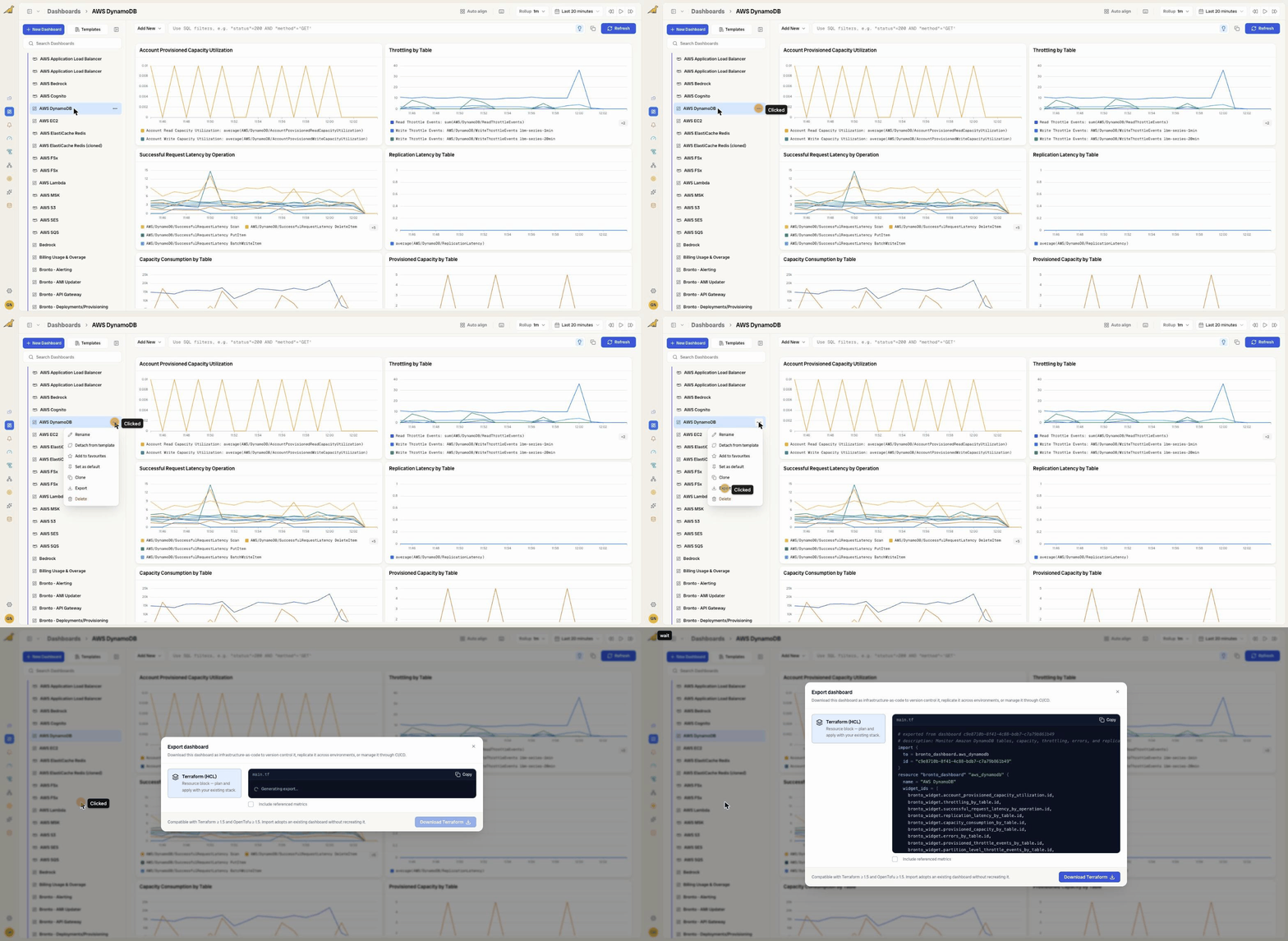
As the clip above shows, the export dialog then shows the generated Terraform, including its import block, ready to copy or download.
API
Like the rest of our UI, the export feature is built on our public REST API. The API docs now include an export endpoint for each resource type supported by Terraform (for example, Export a dashboard), and the dashboard and monitor endpoints include the same flag to bring along their referenced resources. With these endpoints, you can write a script that exports all of your resources into your OaC project.
Importing
Terraform can import existing resources into your project so that it manages them from then on. This requires the resource's UUID and an import block. Both the UI and API exports include these import blocks automatically, so getting your resources under OaC is as easy as possible. The workflow is simple: export, run terraform plan to confirm there's no drift, and when you're happy, terraform apply. See the example below.
Here's what an export looks like, in this case for a user:
# exported from user c0aeed95-3af9-463e-a7fa-42de7cc8388c
import {
  to = bronto_user.bronto_saurus
  id = "c0aeed95-3af9-463e-a7fa-42de7cc8388c"
}

resource "bronto_user" "bronto_saurus" {
  email      = "bronto.saurus@example.com"
  first_name = "Bronto"
  last_name  = "Saurus"
  roles      = []
  active     = true
}
Or Just Ask: Exporting with the Bronto MCP Server
The UI and API exports are a big improvement on writing resources by hand, but we thought we could make it easier still. Enter MCP: we've added an export tool to the Bronto MCP server, so every resource supported by Terraform can also be exported through the MCP. Just ask your LLM, connected to Bronto's MCP server, to export resources directly into your code repository. The server discovers resources, fetches their complete configurations alongside any underlying dependencies, and produces ready-to-use HCL automatically.
I asked Claude to "export the Checkout Dashboard", and it came back with:
The dashboard, its 7 widgets and 8 metric definitions are in exported_dashboards.tf, each with an import block.
One prompt, 16 resources, all ready to import: no hunting for UUIDs, no tracing which widgets and metric definitions the dashboard depends on.
You're not limited to one resource at a time. You can ask it to "export all my monitors into my project and refactor it to parameterise region", and it will export everything and restructure it in one go. This is where Terraform really shines: terraform plan effectively acts as a test. After a refactor like this, if the plan reports no changes, it's a strong indication that the refactor hasn't altered the underlying configuration in Bronto. Your code is cleaner, but what it describes in Bronto remains exactly the same.
Here's what that looked like when I ran it against our test environment. Claude used the MCP server's search_monitors tool to find 72 monitors, then export_resource to export each one along with its metric definition:
File | Contents |
|---|---|
exported_monitors.tf | 72 monitors and 70 metric definitions |
datasets.tf | 12 dataset lookups by name |
It then refactored the export for region:
Endpoint:
var.region(defaulteu) sets the endpoint tohttps://api.<region>.bronto.io.AWS region:
var.aws_regions[var.region]giveslocal.aws_region, which replaces every hard-codedeu-west-1.Datasets: hard-coded dataset IDs became
data.bronto_dataset.<name>.id, looked up by collection and dataset name (35 references).Name clashes: resolved.
Then validate and plan:
$ terraform validate
Success! The configuration is valid.

$ terraform plan
Plan: 142 to import, 0 to add, 0 to change, 0 to destroy.
That last line is the one that matters. All 142 resources (72 monitors plus 70 metric definitions, since some monitors share a definition) are now imported into Terraform, with nothing added, changed or destroyed. The entire existing Bronto configuration is now under management, without changing a single setting.
Seeing What's Managed as Code
The IaC chip
Sometimes there's a mix: some resources are managed in code, while others are still being built or are simply test resources that don't need to be managed as code. In that case, it can be difficult to know which edits will cause drift from the code and which are safe to make. To make it clear what's managed by code, we've added a chip and tooltip that appear on managed resources. See the example below.

How it works: tags
This works simply by adding a managed_by tag (we suggest setting it in default_tags). The supported values are terraform and opentofu. Once it's set, the chip appears on the next UI refresh. And because it's a tag, it's also visible in API and MCP calls.
What the Bronto Provider Manages
The Bronto Terraform provider currently supports the following resources and data sources:
Area | Resources |
|---|---|
Dashboards |
|
Alerting |
|
Notifications |
|
Access |
|
Data sources |
|
Every resource supports terraform import, so anything you've already built by hand can be brought under management without recreating them.
Setup is a standard provider block. The endpoint and API key can also come from the BRONTO_ENDPOINT and BRONTO_API_KEY environment variables. Because OpenTofu runs the same provider binary unchanged, everything here works identically under tofu.
terraform {
  required_providers {
    bronto = {
      source = "brontoio/bronto"
    }
  }
}

provider "bronto" {
  endpoint = "https://api.eu.bronto.io"
  api_key  = var.bronto_api_key

  default_tags = {
    managed_by = "terraform"
  }
}
The default_tags is particularly useful here, it's merged into every taggable resource the provider creates or updates, which is what powers the IaC chip covered above.
A monitor always points at a metric definition, so a typical monitor is two resources, and a dashboard is its widgets, the metric definitions they point to and the dashboard that holds them all:
resource "bronto_metric_definition" "error_rate" {
  name = "api_error_rate"
  queries = [{
    name        = "errors"
    select      = ["count(*)"]
    where       = "status_code >= 500"
    from        = [var.api_dataset_id]
    aggregation = { time = "count", reduce_to = "avg" }
  }]
}

resource "bronto_monitor" "error_rate" {
  name                = "High error rate"
  metric_id           = bronto_metric_definition.error_rate.id
  comparison_operator = "ABOVE"
  threshold           = 50
  warning_threshold   = 25
  window              = "Last 20 minutes"
  actions = [{ type = "EMAIL", email = "oncall@example.com" }]
}

resource "bronto_widget" "errors" {
  name    = "5xx errors"
  type    = "treemap"
  sources = [{ type = "metric", id = bronto_metric_definition.error_rate.id }]
}

resource "bronto_dashboard" "api" {
  name       = "API health"
  widget_ids = [bronto_widget.errors.id]
}
Managing several orgs, as in the opening example, works through aliased provider instances: declare one provider "bronto" block per org, each with its own alias and API key, and point each resource at the right one with provider = bronto.<alias>.
The full per-attribute reference is on the Terraform Registry.
What's Next
More resources. We'll keep adding resources to the provider as we publish the APIs behind them, and SLOs are likely to be next.
Protecting code-managed resources. In a future release, we're considering adding an "Are you sure?" confirmation when someone tries to edit a resource managed as code. If there's demand, we could go further and introduce RBAC controls to restrict editing of code-managed resources, ensuring changes go through the appropriate review process.
Get Started
You can go from ClickOps to Observability as Code in four steps:
Add the provider. Use the
required_providersblock from the provider section above, or grab it from the Terraform Registry. It works with Terraform or OpenTofu.Export what you have. Click Export on a dashboard or monitor, call the export API, or just ask your MCP connected LLM to export it into your project.
Plan, then apply. The first plan should show only imports. If it shows anything to add, change or destroy, look at it before you apply.
Commit it. Push the project to Git, and from then on changes to your observability go through review like any other code.
export BRONTO_ENDPOINT="https://api.eu.bronto.io"
export BRONTO_API_KEY="<your API key>"

terraform init
terraform plan   # expect: N to import, 0 to add, 0 to change, 0 to destroy
terraform apply
Useful links:
Whether you're starting from scratch or bringing an existing Bronto environment under version control, the Terraform provider gives you a consistent way to manage your observability configuration. And with MCP, getting there can be as simple as asking.
Not a Bronto customer yet? Start your free 14-day trial, no credit card required, and manage your observability configuration as code from day one. Prefer a walkthrough first? Book a demo.
Enjoyed this post?
Share it with your team or network.

Try Bronto free for 14 days
Centralize your agent and infrastructure telemetry in one platform with sub-second search and 12-month hot retention.
- 14-day free trial
- No credit card
- Set up in minutes