
Creating Custom Agents: Inside Bronto’s Alert Investigation Agent
Nikolai Gladychev
Senior Software Engineer
Using generalist agents (e.g., Claude Code) with Bronto’s MCP server is powerful and effective, but for well-defined and repeated tasks, specialised custom agents can offer significant advantages including improved reliability, faster execution, and better token efficiency. It is becoming increasingly common for teams to write specialised agents for SRE workloads, and we want to make it effortless for people to write their own custom agents with Bronto.
We previously showed how a basic LangGraph agent could leverage our MCP server, and now we’ve released an open source alert investigation agent that replicates our in-platform Alert Investigation feature. It is a small reference project that you (or your agent) can use to see the best patterns for integrating Bronto into your LangGraph agents.
Below, I’ll demonstrate how easy it is to write custom agents with Bronto’s powerful set of MCP tools, and then dive into the architecture and code that make our open source alert investigation agent work. If you want to learn more about what our agent does and how to use it, check out our announcement post. Don't worry if you're not a LangGraph expert, we'll show you in detail how we used it to build our agent. We will also show how easy it is to send telemetry data from the agent to Bronto.
Building Custom Agents with LangGraph and Bronto MCP
LangChain and LangGraph are two powerful and complementary libraries for wiring LLM calls into structured state machines. To make that process even smoother, we’ve released the Bronto SDK for Python: a small, typed client for the Bronto REST API, plus helpers that encode Bronto-specific details. Combine these tools, and you can build a remarkably effective agent connected to Bronto's MCP in about 20 lines of code:
import asyncio
import os
import sys
from bronto_sdk import mcp as bronto_mcp
from langchain_mcp_adapters.sessions import create_session
from langchain_mcp_adapters.tools import load_mcp_tools
from langchain.agents import create_agent
from langchain.chat_models import init_chat_model


async def investigate(user_prompt: str):
    api_key = os.environ.get("BRONTO_API_KEY")
    bronto_region = os.environ.get("BRONTO_REGION")
    async with create_session({
        "transport": "streamable_http",
        "url": bronto_mcp.url(bronto_region),
        "headers": bronto_mcp.auth_headers(api_key=api_key)
    }) as session:
        await session.initialize()
        mcp_tools = await load_mcp_tools(session)
        llm = init_chat_model("claude-sonnet-5", model_provider="anthropic")
        agent = create_agent(llm, tools=mcp_tools)
        result = await agent.ainvoke({"messages": [("user", user_prompt)]})
        print(result["messages"][-1].content)


asyncio.run(investigate(sys.argv[1]))
With just this snippet, you have an agent that can handle complex, natural-language questions like, "What are the p99 response times on my API gateway, broken down by resource?"
To run the sample code in this blog, ensure you have Python and
|
The magic in the python snippet above lies in LangGraph's create_agent method, which gives your LLM a built-in ReAct (Reason + Act) loop. Historically, you had to write a lot of boilerplate to give an agent a set of tools, then make it look at its context, execute a tool, re-evaluate, execute a tool, etc.., and loop until the task was done. Now, create_agent handles that entire lifecycle.
To connect that agent to Bronto, you can use the langchain_mcp_adapters library. Looking at the code above, it takes just three lines to connect:
Open a connection to Bronto’s remote MCP using
create_session.Complete the required MCP handshake using
session.initialize().Load Bronto's MCP as LangChain-native tools using
load_mcp_tools(session).
Controlling Tool Use
A very typical thing you might want to do, is to restrict the tools used by an agent. By restricting a ReAct loop to a specific subset of MCP tools, you give the LLM only what it needs for a particular step. This reduces the chance of the agent making an error by picking the wrong tool and it also reduces the context window size:
ALLOWED_TOOLS = {"get_datasets", "get_keys", "search_logs", "timeseries"}
...
        all_mcp_tools = await load_mcp_tools(session)
        mcp_tools = [t for t in all_mcp_tools if t.name in ALLOWED_TOOLS]
        agent = create_agent(llm, tools=mcp_tools)
Using Langraph Middleware
You can strictly control the internal state of a LangChain ReAct agent using its Middleware system. This allows you to intercept the agent mid-loop to modify LLM requests, insert human-in-the-loop approvals, or handle errors automatically. LangChain ships with several built-in middlewares for common use cases:
from langchain.agents.middleware import ToolRetryMiddleware, ModelCallLimitMiddleware

...

    agent = create_agent(
                llm,
                tools=mcp_tools,
                middleware=[
                    ToolRetryMiddleware(max_retries=2, on_failure="continue"),
                    ModelCallLimitMiddleware(run_limit=5, exit_behavior="end")
                ]
            )
In this snippet, there are two standard middlewares:
ToolRetryMiddleware: Automatically retries failed tool calls. If it continues to fail, it feeds the error details back to the LLM so the agent can decide if it should try a different approach.ModelCallLimitMiddleware: Prevents excessive agent loops by hard-terminating the agent if it exceeds a set number of LLM calls.
The Bronto open-source investigation agent also uses some custom middleware such as:
InvestigationWindowMiddleware: Automatically injects the correct time-range parameters into tool calls based on the triggered monitor. By handling this under the hood, we prevent the LLM from having to calculate timestamps (and potentially hallucinating them).ConcludeWithinBudgetMiddleware: A smarter version of the model call limiter. Instead of abruptly killing the agent mid-thought when it hits a limit, it instructs the agent to generate a best-effort conclusion based on the data it has gathered so far.
Structured LLM Responses
Historically, extracting structured objects from LLMs was an error-prone headache. Today, LangChain makes it trivial. By simply passing a Pydantic model as a parameter into the create_agent method, you guarantee the exact shape of your final response. Under the hood, LangChain automatically routes this request through the LLM’s structured output API. If the specific model doesn't have one, it falls back to using the LLM’s tool-calling API to enforce your schema.
from pydantic import BaseModel, Field
from langchain.agents import create_agent

...

class CoffeeOrder(BaseModel):
    drink_type: str = Field(description="The main coffee drink")
    milk: str = Field(description="Type of milk requested")
    shots: int = Field(description="Total number of espresso shots")
    is_iced: bool = Field(description="True if the user wants it iced")

...
    agent = create_agent(
        llm,
        system_prompt='Extract customers coffee order from their message.',
        response_format=CoffeeOrder
    )
    result = agent.invoke({ "messages": [("user", users_order)]})
    order: CoffeeOrder = result["structured_response"]
The LangGraph Framework
At its core, LangGraph defines an agent as a directed cyclic graph. Every node in this graph is just a plain Python function that takes in the current state, executes a step, and returns updates to that state.
The state itself is a TypedDict that acts as the agent's global memory. Crucially, state is not the same as the LLM context window. You typically only map a small, relevant portion of the global state into the LLM's context for any given call. Because this state is fully serializable, LangGraph saves a snapshot after every single node executes. This lets you pause and resume execution for human-in-the-loop approvals, recover from crashes, or even "rewind" the agent to a previous step.
class InvestigationState(TypedDict):
    request_text: str | None
    triggered_alert: dict[str, Any] | None
    playbook: str | None
    alert_context: AlertContext | None
    findings: dict[str, Any] | None
    report: str | None
To keep your top-level graph clean, the best practice is to encapsulate complex logic into a sub-graph and drop it in as a single node.
For example, the create_agent method we used earlier actually returns a CompiledStateGraph, which is a complete sub-graph that you can drop right into your main graph. By design, sub-graphs do not automatically inherit the parent’s state. This isolation keeps your architecture clean: the parent graph doesn't get cluttered with the child's messy internal variables, and the child doesn't waste tokens loading the parent's entire chat history.
Inside The Bronto Investigation Agent
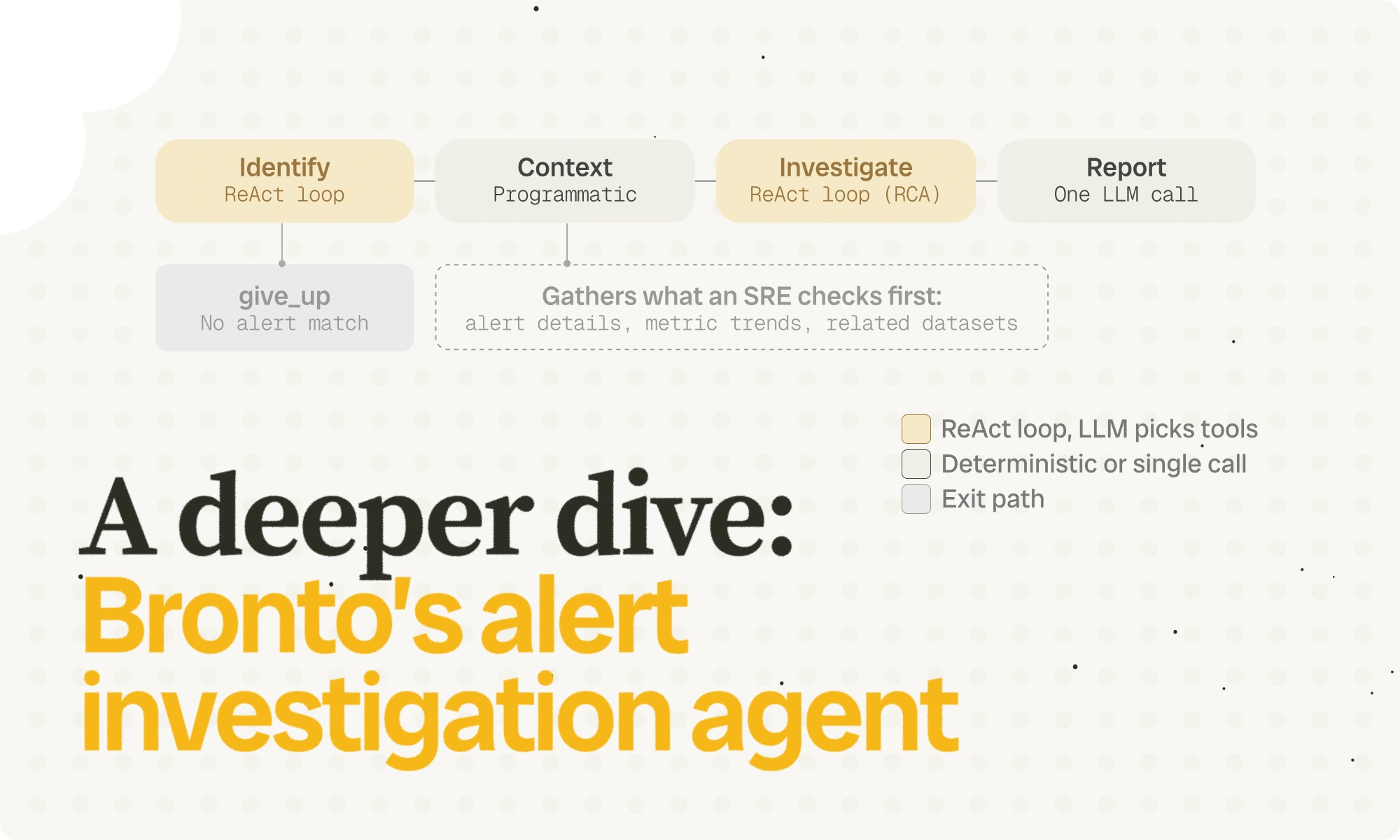
Our open-source agent is built around a five-node graph. Rather than making every single step a complex agent, we selectively mix full ReAct loops with simple programmatic steps to keep execution fast and efficient:
identify: Uses a full ReAct loop (as described above) to search the audit log and pinpoint the alert matching the user’s description.give_up: A logic node that gracefully exits with an error if an alert matching the user’s description could not be foundcontext: Gathers system context for the investigation, e.g, from the monitor details, triggered alert details, and the underlying log data.investigate: The core engine. This node runs another ReAct loop to drill into the logs and perform the actual Root Cause Analysis (RCA).report_generation: A simple, single LLM call that takes the RCA findings and formats them into the final structured report.
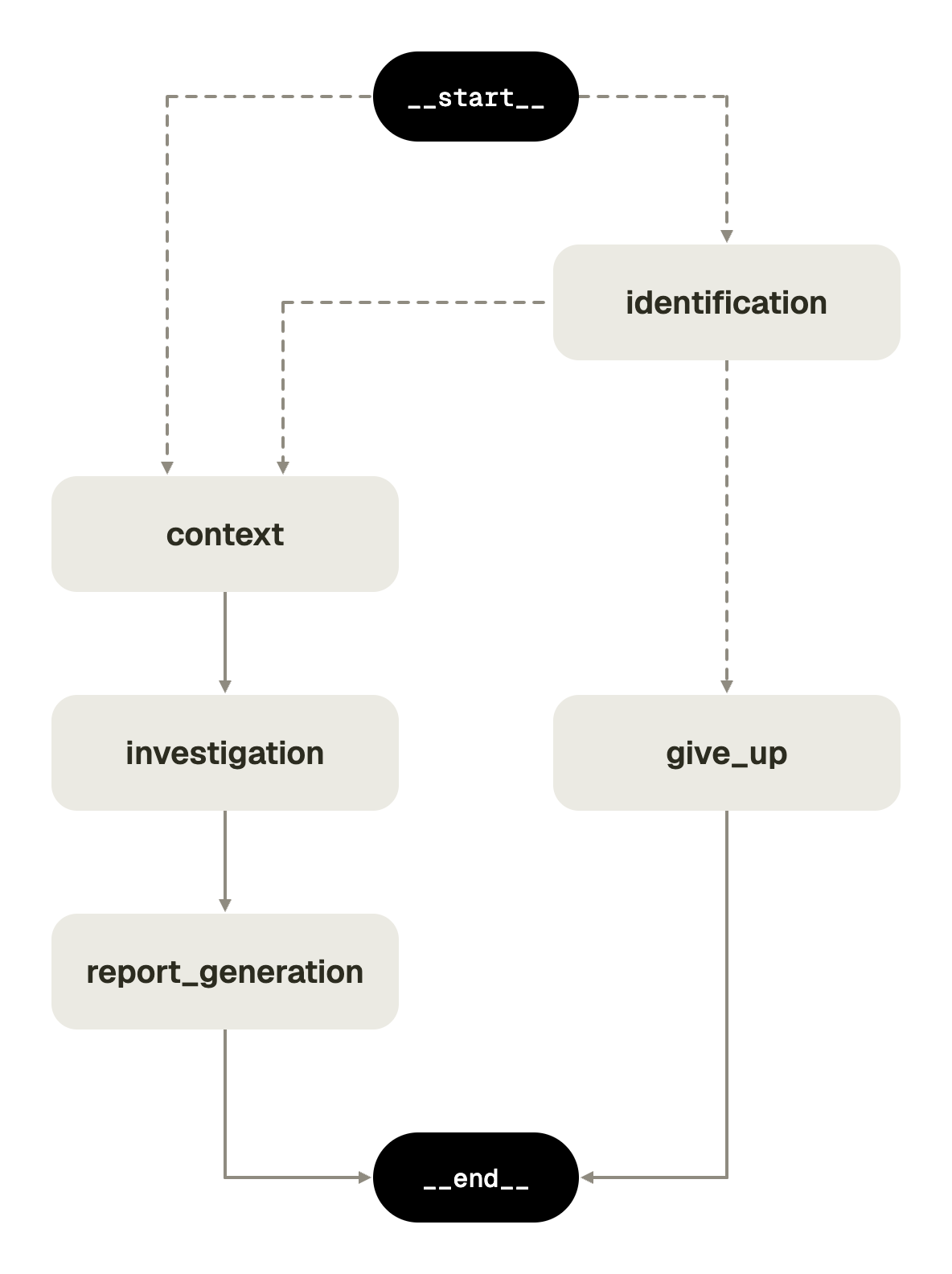
The context node is arguably the most valuable piece of this architecture, because it is the key thing that differentiates the agent compared to a simple ReAct loop with Bronto’s MCP tools.
The context generation node assembles the things an SRE would look at first, and it is a largely deterministic, programmatic phase with minimal LLM calls and no ReAct loops. This portion of the agent has relatively more freedom for data discovery and exploration, with the later “investigate” phase being more strictly restricted to investigating.
During this phase, the agent gathers:
details on the triggered alert and underlying monitor,
trends on the monitor’s state and the underlying data around the time when the monitor triggered,
datasets that are not directly acted upon by the monitor but which are likely related when things break (e.g., service dependencies).
Instrumenting Your Agent
Building an agent is only half the battle; you also need to see exactly what it’s doing in production. Fortunately, there is a very simple way to instrument your LangGraph agent. By using the opentelemetry libraries, you can auto-instrument your entire agent with detailed tracing in just a few lines:
...
from opentelemetry.instrumentation.genai.langchain import LangChainInstrumentor
from opentelemetry.instrumentation.httpx import HTTPXClientInstrumentor
...

# Invoke these at the start of your agent

# Auto-instruments LangChain and LangGraph calls
LangChainInstrumentor().instrument()

# Auto-instruments underlying HTTP/REST requests (including remote MCP calls) HTTPXClientInstrumentor().instrument()

...
from opentelemetry.instrumentation.genai.langchain import LangChainInstrumentor
And you can use the standard OpenTelemetry SDK to export this data directly to Bronto (or any OTEL-compatible backend) for collection and analysis:
from opentelemetry import trace
from opentelemetry.exporter.otlp.proto.http.trace_exporter import OTLPSpanExporter
from opentelemetry.sdk.resources import Resource
from opentelemetry.sdk.trace import TracerProvider
from opentelemetry.sdk.trace.export import BatchSpanProcessor

...

# Invoke at the start of your agent

# OTLPSpanExporter automatically picks up OTEL_EXPORTER_OTLP_ENDPOINT
# and OTEL_EXPORTER_OTLP_HEADERS from the environment variables.

provider = TracerProvider(resource=Resource.create({"service.name": SERVICE_NAME})) provider.add_span_processor(BatchSpanProcessor(OTLPSpanExporter())) trace.set_tracer_provider(provider)

...
Putting it all together, here is how we modify that trivial ~20-line agent from the beginning of this post so it automatically sends its traces straight into Bronto:
import asyncio
import os
import sys
from bronto_sdk import mcp as bronto_mcp
from langchain_mcp_adapters.sessions import create_session
from langchain_mcp_adapters.tools import load_mcp_tools
from langchain.agents import create_agent
from langchain.chat_models import init_chat_model
from opentelemetry import trace
from opentelemetry.instrumentation.genai.langchain import LangChainInstrumentor
from opentelemetry.exporter.otlp.proto.http.trace_exporter import OTLPSpanExporter
from opentelemetry.instrumentation.httpx import HTTPXClientInstrumentor
from opentelemetry.sdk.resources import Resource
from opentelemetry.sdk.trace import TracerProvider
from opentelemetry.sdk.trace.export import BatchSpanProcessor

async def investigate(user_prompt: str):
    api_key = os.environ.get("BRONTO_API_KEY")
    bronto_region = os.environ.get("BRONTO_REGION")
    async with create_session({
        "transport": "streamable_http",
        "url": bronto_mcp.url(bronto_region),
        "headers": bronto_mcp.auth_headers(api_key=api_key)
    }) as session:
        await session.initialize()
        mcp_tools = await load_mcp_tools(session)
        llm = init_chat_model("claude-sonnet-5", model_provider="anthropic")
        agent = create_agent(llm, tools=mcp_tools)
        result = await agent.ainvoke({"messages": [("user", user_prompt)]})
        print(result["messages"][-1].content)

LangChainInstrumentor().instrument()
HTTPXClientInstrumentor().instrument()

provider = TracerProvider(resource=Resource.create({"service.name": "myAgent"}))
provider.add_span_processor(BatchSpanProcessor(OTLPSpanExporter()))
trace.set_tracer_provider(provider)

asyncio.run(investigate(sys.argv[1]))
Now by setting the OTEL_EXPORTER_OTLP_ENDPOINT=https://ingestion.<region>.bronto.io and OTEL_EXPORTER_OTLP_HEADERS=x-bronto-api-key=<your Bronto api key> environment variables you can push the agent's tracing data straight into Bronto to examine and monitor its exact reasoning steps:
Stop Guessing, Start Building
Outsourcing tasks to AI is easy; building an agent you actually trust to investigate a production outage is hard. Or at least, it used to be.
By combining LangGraph’s deterministic state machines with Bronto’s powerful MCP tools, you now have the architecture to build agents that gather context like a human, reason within strict guardrails, recover from errors gracefully, and report their exact telemetry via standard OpenTelemetry.
We open-sourced the Alert Investigation agent so you don't have to start from scratch. Use it as a standalone tool to reduce your MTTR today, or use it as the foundation for your team's next big internal tool.
Sign up for a Bronto free trial here and head over to the GitHub repo to give the agent a spin. Don’t forget to let us know what you build!
Head over to the GitHub repo to get started.
Enjoyed this post?
Share it with your team or network.

Try Bronto free for 14 days
Centralize your agent and infrastructure telemetry in one platform with sub-second search and 12-month hot retention.
- 14-day free trial
- No credit card
- Set up in minutes